Refund and void reasons
Who: an Admin. When: before the first shift. Servers can't void an item sent to the kitchen until at least one reason exists.
Quick version
Setup › Refunds and voids › Add new reason › name › Add reason.
1. Add a reason
Go to Setup › Refunds and voids and click Add new reason. Type the reason and click Add reason. Add a few, such as Customer changed their mind and Wrong item sent.
2. Choose what each reason does
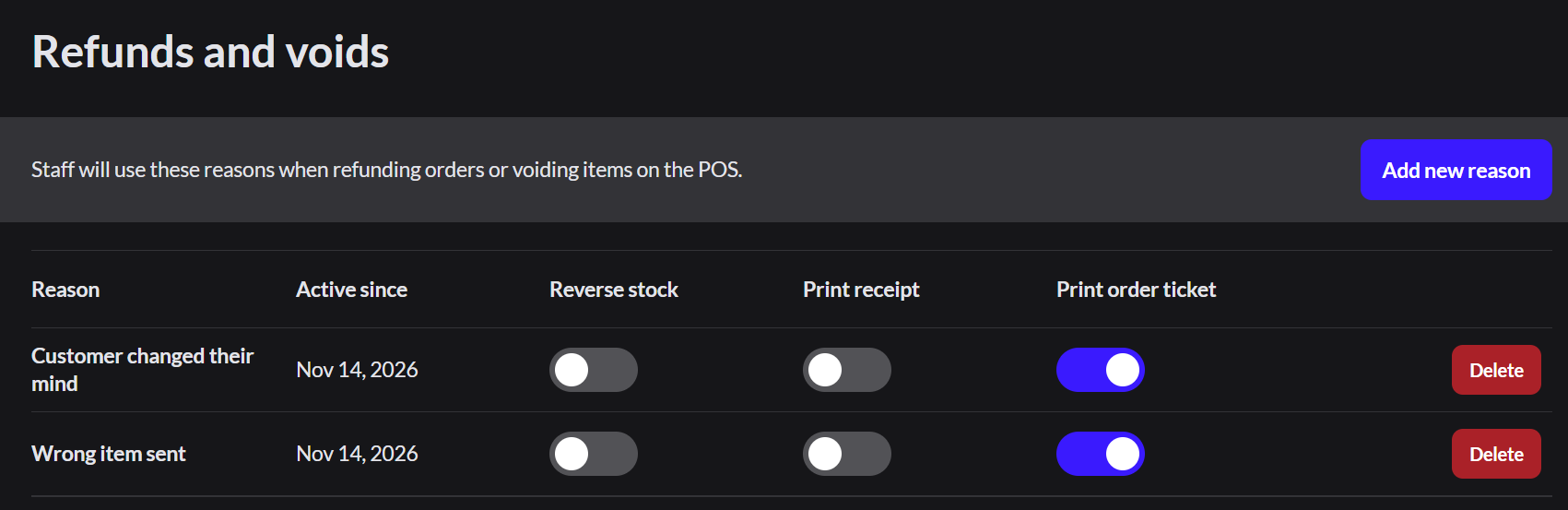
| Switch | When on |
|---|---|
| Reverse stock | The item goes back into stock. Leave off for food that was already made |
| Print receipt | Prints an internal slip listing the voided items. It isn't the customer's receipt |
| Print order ticket | The kitchen gets a ticket saying the item is canceled |
What to do next
Restaurant setup is done. Before the first order:
- Check the register's POS configuration, such as tabs and tips.POS configurations
- Open the register
- Take an order and send it to the kitchen