Demo mode
Who: anyone learning the POS. When: training, or trying something before doing it for real.
Demo mode opens a separate practice store. What you do there doesn't affect your store's real sales, reports or books.
Quick version
Turn on the Demo mode switch at the top left › practice › turn it off.
Turn Demo mode on
Turn on the Demo mode switch at the top left of the window.
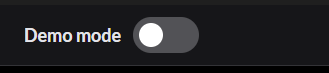
The same switch is on Setup › General and in the panel that opens when you click your name.

The screen says Opening Demo mode… and then opens the practice store. It has its own products, sales and register.
Practice
Everything works as it normally does. You can open the register, ring up sales, take payments and give refunds.
- Card payments in Demo mode only accept the card provider's practice cards. Real cards are declined and nothing is charged.
- Admins only: Reset demo store clears the practice store for everyone.
Go back to your store
Turn off the Demo mode switch. You can also use the AutoLNK POS menu and click Back to your store.
Check the switch before you serve a customer. A sale rung up in Demo mode isn't a real sale.